Skip to content
SuperDigi

1 / 8

main_cover
Software packageFeaturedSoftware & Micro-SaaS

CSV ChangeGuard

Know what changed before your next Shopify import.

Compare supplier catalogs, catch price and stock changes, clean CSV/XLSX data, and prepare safer Shopify imports locally. Reuse mappings, review every export, and pay once—without API keys or subscriptions.

  • Offline Processing
  • CSV + XLSX
  • One-Time Purchase
  • No Shopify API Required
Price: $29.00Original price: $49.99Save 42%
Buy now

Secure checkout by Gumroad, our Merchant of Record. Your download link arrives by email.

Please read the limitations before buying

Format
Software package
Version
1.0.0
Category
Software & Micro-SaaS
Delivery
Instant download after payment is confirmed
Updates
Current version only

See it in action

Watch a 19-second walkthrough of the real application: preview a supplier CSV, map columns, review validation, compare catalogs, and download a draft-product CSV. The recording uses fictional supplier data and does not show a live Shopify import.

Overview

🛡️ SuperDigi CSV ChangeGuard

Supplier spreadsheets change, but the consequences are easy to miss. A higher cost can squeeze your margin. A missing product can create uncertainty. Different column names can turn a routine catalog update into a long session of copying, checking, and reformatting. SuperDigi CSV ChangeGuard helps you understand those changes before you prepare your next Shopify import.

💻 Runs locally in your desktop browser

Built for store owners, catalog managers, and freelancers, ChangeGuard runs locally in your desktop browser. Download the ZIP, extract it, and open the application. There is no application account, API key, local server, or customer programming environment to configure. Core processing works offline, and the application does not upload your supplier spreadsheets to a service.

📊 Map and validate your supplier files

Start with a CSV or ordinary XLSX workbook. Preview the rows, choose the worksheet when needed, and map supplier headings into consistent fields. Automatic suggestions give you a starting point; you decide which mappings to apply. Save a supplier profile for future files, including its decimal convention and pricing configuration, and export a JSON backup to keep that setup portable.

🔍 Review your data with clear row-level findings. Catch missing titles, duplicate SKUs, invalid prices, conflicting variant combinations, and other supported checks. Preview available corrections before applying them, generate missing product handles, and undo supported catalog edits. Product and variant identities are handled separately, while identifiers are preserved rather than silently reformatted.

🔄 Compare catalogs and preview pricing

Load a previous supplier catalog to see what changed. Review new, missing, changed, unchanged, and conflicting records, with price, cost, and stock differences where available. Editable thresholds highlight changes worth investigating. A product missing from the latest supplier file is marked for review; it never becomes an automatic deletion or archive instruction.

💰 Turn supplier costs into proposed retail prices using markup, target gross margin, or fixed profit, with minimum-price and rounding options. Markup and margin use different calculations: a cost of $20 becomes $30 with 50% markup, or $40 at a 50% target gross margin. Preview recalculated prices before committing them.

🛍️ Prepare deliberate Shopify CSV exports

When you are ready to prepare a Shopify file, new products default to draft and unpublished. Inventory quantities stay excluded unless you explicitly select the single-location workflow. Existing-product exports are deliberately limited to price and cost updates, using a separate current Shopify export, confirmed handles, exact options, and the complete unchanged variant set. Review the exact output columns and records before downloading.

📑 Share clear change reports

ChangeGuard also produces CSV, JSON, and print-friendly HTML change reports for internal reviews or client handoffs. Supplier profiles persist locally; raw catalog sessions do not survive a reload, so keep your source files and back up your profiles.

📦 What your purchase includes

🎁 Your one-time purchase includes the application, three PDF guides with HTML equivalents, fictional practice datasets, and the supplied commercial-use license. Use it for your own business or client catalog work. Back up your Shopify catalog and test a small import first: ChangeGuard prepares files for your review and does not connect to your store or guarantee acceptance of every catalog.
Features

  • Offline local processingReview supplier files on your own computer without application accounts, uploads, API keys, or a recurring app subscription.
  • CSV and ordinary XLSX importPreview actual rows, select worksheets, and choose CSV delimiters or encoding before applying mappings.
  • Editable column suggestionsTranslate suppliers’ different headings into a consistent catalog while retaining manual control.
  • Reusable supplier profilesSave mappings, decimal convention, and pricing settings; import/export JSON backups and manage profiles locally.
  • Supplier-scoped matchingCompare exact immutable variant IDs, SKUs, or explicit handle/options within a supplier scope instead of guessing from titles.
  • Product and variant groupingKeep related variants together using product identifiers and up to three mapped option pairs.
  • Clear validation and searchable tablesFind supported data-quality issues by source row, severity, value, and recommended correction; search, sort, and paginate tables.
  • Previewed corrections with undo/redoReview text trimming, selected non-identity edits, generated handles, or pricing changes before applying them; retain up to ten prior catalog states.
  • Preserved existing handlesGenerate missing handles while keeping existing ones, reducing accidental identity changes.
  • Practical pricing rulesCalculate markup, target gross margin, or fixed profit with minimum prices and rounding; preview the results.
  • Old/new catalog comparisonsSee new, missing, changed, unchanged, and conflicting variant records, including supported field differences.
  • Editable review alertsHighlight price/cost percentage changes, stock reductions, zero stock, and missing records for attention.
  • Draft-first new-product CSVsPrepare supported Shopify columns with draft/unpublished defaults and inventory excluded unless explicitly selected.
  • Conservative existing-product updatesExport selected price/cost fields only after snapshot-based handle and complete variant-set checks.
  • Shareable review reportsDownload CSV, JSON, or print-friendly HTML change reports; export a separate validation CSV for colleagues or clients.

Benefits

  • Understand supplier changes before preparing an import.
  • Reuse supplier configurations rather than remapping every routine file.
  • Review data and proposed pricing changes before applying them.
  • Prepare draft-first new products and tightly scoped price/cost updates.
  • Keep spreadsheet processing local and share clear reports with colleagues or clients.

How it works

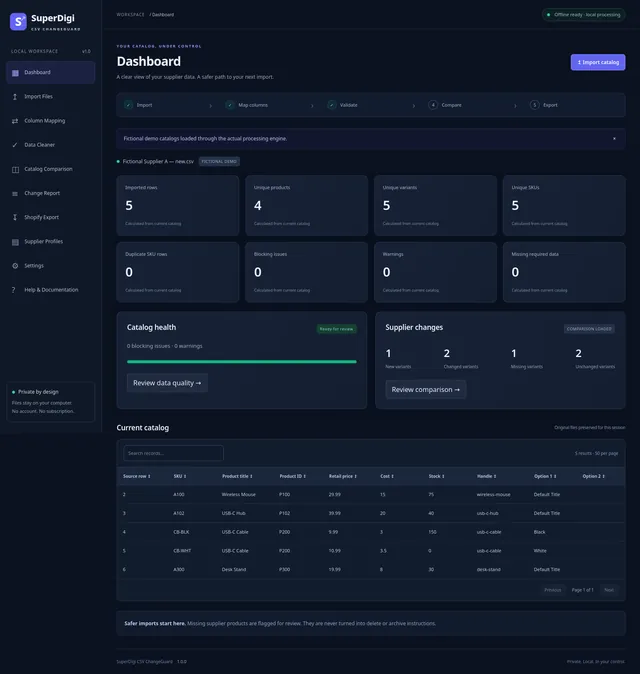
  1. Import

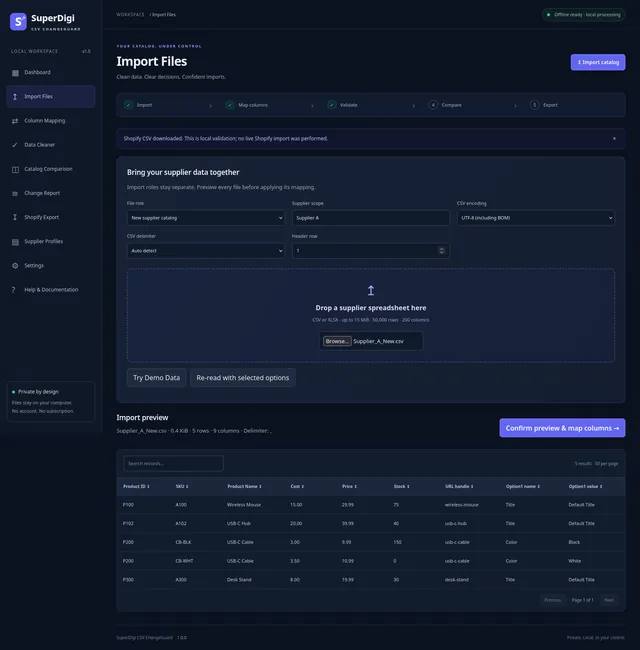
    Extract the ZIP, open the local application, and optionally select Try Demo Data. Import the latest CSV or XLSX with the New supplier role, choosing encoding, delimiter, worksheet, or header row when needed.

    SuperDigi CSV ChangeGuard dashboard showing fictional supplier catalog health and changes.
  2. Map

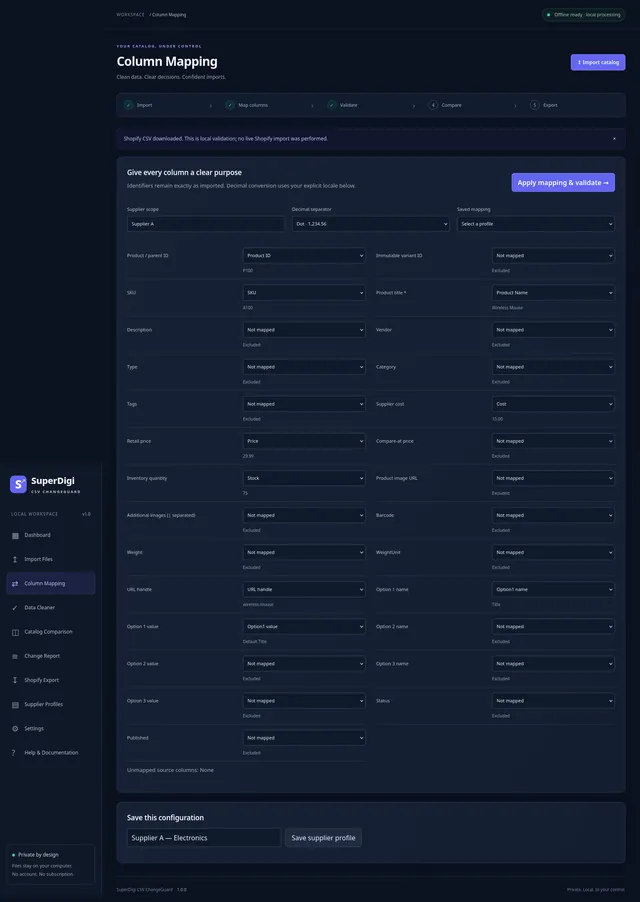
    Review the preview, map columns, select the decimal convention, and use a consistent supplier scope. Save a profile if useful.

    CSV import preview with supplier columns and local file controls.
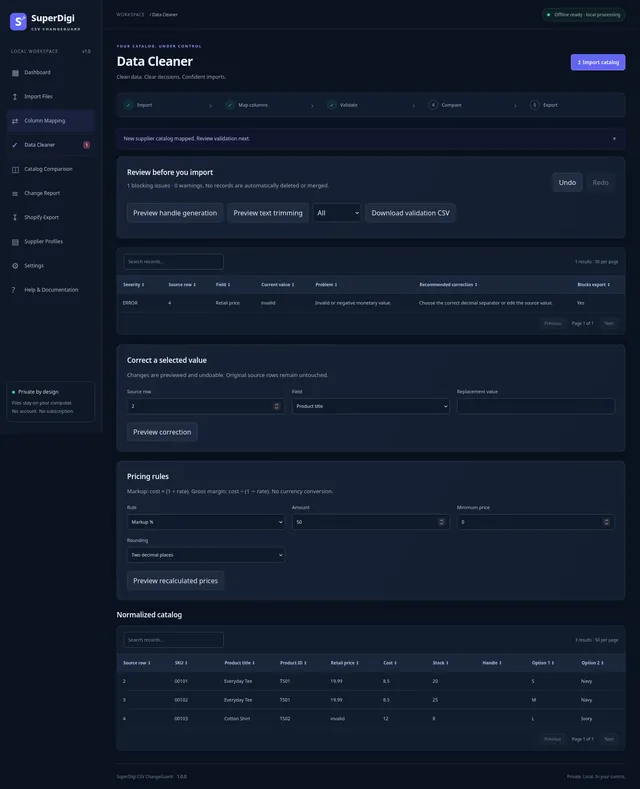
  3. Validate

    Review findings. Correct source data or preview the supported text, handle, and pricing edits; reimport identity changes.

    Supplier column mapping interface with editable product-field destinations.
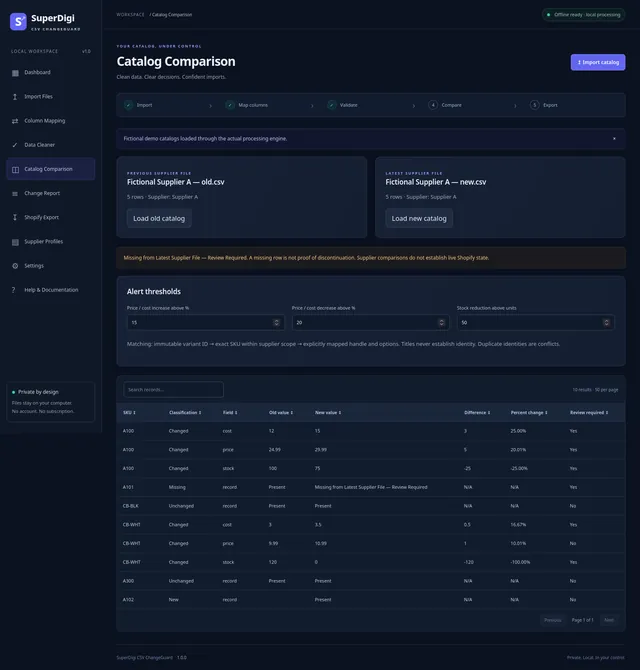
  4. Compare

    Optionally load and separately map the previous supplier file using the same scope, then see what changed.

    Validation results identifying an invalid retail price in a fictional supplier workbook.
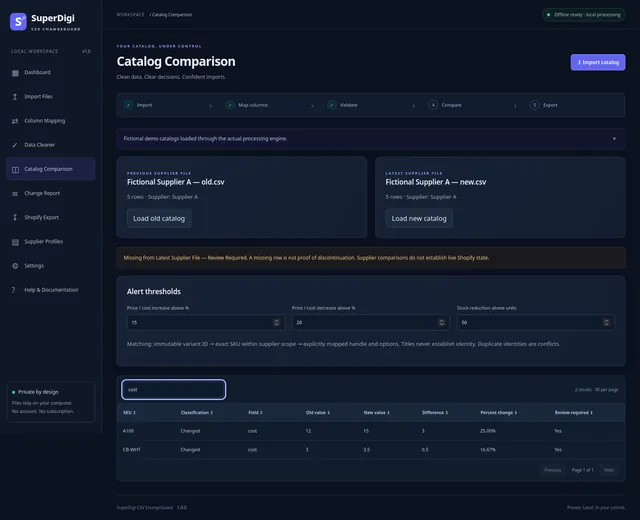
  5. Review

    Investigate changes and conflicts, then choose report-only, new-product CSV, or a price and cost update with a separate current Shopify snapshot.

    Old and new supplier catalog comparison with review thresholds and change records.
  6. Export

    Review the exact output, resolve blockers, confirm the workflow, and download. Back up Shopify and test a small manual import.

    Supplier comparison filtered to show cost changes and review indicators.

Who it's for

  • Shopify store owners
  • Dropshipping catalog managers
  • Inventory and product-data managers
  • Wholesalers and distributors preparing supplier data
  • E-commerce virtual assistants
  • Freelancers managing client catalogs

What's included

  • Offline HTML application (01_Application/index.html)
  • Three PDF guides with HTML equivalents: Quick Start Guide, Complete User Manual, and Shopify Import Safety Guide
  • Six fictional demo datasets: an electronics old/new pair, electronics review errors, a multi-sheet Fashion XLSX, a Home CSV, and a Shopify example export
  • Commercial-use license and third-party notices
  • Product demonstration video (MP4 and WebM)
  • Seven application screenshots
  • Compatibility, Shopify schema, QA, verification, security summary, and changelog documents
  • README and product marketing notes

Requirements

  • Desktop Windows, macOS, or Linux computer with a current Chrome, Edge, or Firefox browser.
  • Test evidence varies by environment: Firefox 157.0 on Linux passed automated checks. The developer reports successful Windows, macOS, Chrome, and Edge checks; exact versions and combinations were not recorded.
  • Safari and mobile browsers are not claimed as supported. The app is for desktop browsers, even though you can browse this page on a phone.
  • JavaScript, local file selection and downloads, and browser storage enabled. Native deflate-raw DecompressionStream is required for compressed XLSX.
  • Ability to extract ZIP archives. No Node.js, Python, database, extension, application account, API key, hosting, or local server needed.
  • Input: CSV or ordinary XLSX, at most 15 MiB, 50,000 rows, and 200 columns. Shopify CSV output: at most 15,000,000 bytes.
  • Internet is needed to purchase, download, and import into Shopify, but not for core ChangeGuard processing.
  • Adequate free memory and disk space for your data. No tested minimum RAM or CPU specification is available.

Important limitations

  • No live Shopify connection: ChangeGuard has no Shopify API synchronization and never imports into your store. You review the CSV and import it yourself.
  • Existing-product exports update price and cost only, not titles, descriptions, options, SKUs, status, or every Shopify field.
  • Updates require a current Shopify export plus explicitly mapped handles and exact complete variant sets. Generated handles or a supplier SKU alone do not authorize overwrite targets.
  • Supplier changes are not proof of live Shopify state. Missing records never trigger automatic deletion or archiving.
  • Inventory export is opt-in for confirmed single-location cases. Multi-location inventory is unsupported.
  • Input limits: 15 MiB, 50,000 data rows, 200 columns. Shopify CSV output: 15,000,000 bytes maximum. Processing can pause the interface, and large-file browser responsiveness is not guaranteed.
  • XLSX is a restricted ordinary-workbook reader, so not every workbook is supported. Formulas and cached results are ignored, dates retain serial values with warnings, and encrypted, ZIP64 or unusual workbooks may fail.
  • No automatic currency conversion, arbitrary transformation chains, weight export or conversion, taxonomy-membership verification, or live image-availability checks. New exports always use draft and unpublished values.
  • Descriptions are exported literally and are not sanitized for Shopify HTML, so review source HTML. Formula-like text blocks Shopify exports.
  • Raw catalog sessions are not saved and do not survive a reload. Supplier profiles use unencrypted browser storage and need JSON backups. Moving the app or clearing browser data can affect them.
  • Safari, mobile use, browser print-to-PDF, and universal supplier or store compatibility are not verified. No minimum RAM or CPU specification is established.
  • Shopify acceptance of every catalog is not guaranteed. Independent Shopify-compatible CSV preparation tool; not developed, certified, sponsored, or endorsed by Shopify. Back up your store, review variants and overwrite settings, and test a small import.
  • Not suitable if you need scheduled unattended automation, direct store or API access, generic bulk changes to existing product fields or variants, a complete Excel or formula engine, or mobile-first operation.

Installation & usage

  1. Download and fully extract your ZIP.
  2. Open 01_Application/index.html in your desktop browser.
  3. Start with 02_Documentation/Quick_Start_Guide.pdf and select Try Demo Data.
  4. Keep your source files and export supplier-profile backups.
  5. Back up Shopify and test a small import before broader changes.

Delivery

After checkout, Gumroad emails your receipt with a link to your download: one ZIP of about 7.1 MB.

License

One purchase for one person or business, including internal commercial use and client catalog-management work. Generated outputs may be shared. Application redistribution, resale, giveaway, or sharing is prohibited without written permission. No remote activation/account/license server. Third-party licenses retain their own rights. Not independently legally reviewed.

Frequently asked questions

What does CSV ChangeGuard do?

It maps and validates supplier spreadsheets, compares old/new supplier catalogs, calculates proposed prices, and prepares reviewable Shopify CSV files and reports. You perform the actual Shopify import yourself.

Does it work offline?

Yes. After downloading and extracting the package, core processing works offline. Opening the packaged HTML through file:// with an offline browser context passed automated Firefox/Linux checks. Purchasing and downloading through Gumroad still require internet access.

Which file formats can I import?

CSV and ordinary XLSX workbooks. CSV supports comma, semicolon, and tab delimiters, quoted fields, and selectable UTF-8, Windows-1252, or UTF-16 LE decoding. XLSX supports worksheet selection within a restricted workbook subset.

Does it calculate Excel formulas?

No. XLSX formulas and cached formula results are ignored with warnings. Date-formatted numeric cells retain serial values with warnings. Encrypted/ZIP64 workbooks and some unusual workbook structures are unsupported. Replace formulas with verified literal values before importing.

Can it create Shopify products?

It generates a CSV for supported new-product fields. Exports default to draft and unpublished, require explicit prices and handles, and exclude inventory unless you opt into the single-location workflow. The developer reports four successful draft-product imports in a development store.

Can it update existing Shopify products?

Version 1.0.0 supports price and cost updates only. You need a current Shopify export, explicitly mapped existing handles, exact option identities, and the complete unchanged variant set for each targeted product. SKU alone is insufficient. The developer reports a successful price-only update preserving other information.

Does it connect to or modify my Shopify store?

No. It has no Shopify API connection. You download the prepared CSV, review it, and import it through Shopify yourself. Review Shopify’s publishing and overwrite settings, back up your catalog, and test a small batch.

Will Shopify accept every generated CSV?

No guarantee is made. The supported schema subset was checked against official documentation on November 7, 2026. Local validation, automated fixtures, and developer-reported example imports do not cover every store configuration or supplier format.

Does it require a subscription, license key, or application account?

No recurring app subscription, remote activation, license key, or application registration is required. ChangeGuard is a one-time purchase. Gumroad checkout and delivery are separate from offline application use.

How do I install and launch it?

Extract the entire downloaded ZIP, open 01_Application, and open index.html in a supported desktop browser. No Node.js, Python, database, terminal, browser extension, or local web server is required for customers.

Does it work on Windows, macOS, and Linux?

Automated evidence covers Firefox 157.0 on Linux. The developer reports successful Windows/macOS and Chrome/Edge checks; exact versions and platform/browser combinations were not supplied. Safari and mobile browsers are not claimed as supported.

Are my files uploaded or stored in the cloud?

The application processes files locally and contains no upload, telemetry, analytics, or remote API workflow. The packaged Firefox acceptance run observed zero HTTP(S) requests. Supplier profiles are saved in browser storage; raw catalogs stay in session memory. Local storage is not encrypted.

How does supplier comparison match records?

It uses exact supplier-scoped immutable variant IDs, otherwise SKUs, otherwise explicitly mapped handles with option names/values. Titles alone never establish matches. Duplicate or unresolved identities require review. Use the same supplier scope for old and new versions.

Does a missing supplier record delete or archive a Shopify product?

No. It is marked Missing from Latest Supplier File — Review Required. Supplier absence does not establish discontinuation or live store state, and the application does not generate automatic deletion/archive instructions.

Can I reuse mappings for different suppliers?

Yes. Save separate supplier profiles and export JSON backups. Profiles include mappings, decimal convention, and pricing configuration. The comparison workspace handles one old/new catalog pair at a time; it is not a centralized supplier database or automatic synchronization service.

What size files can it handle?

Input is limited to 15 MiB, 50,000 data rows, and 200 columns. Shopify CSV output is limited to 15,000,000 bytes. The engine was benchmarked at 50,000 rows, but equivalent browser responsiveness/memory is unverified. Large files may pause the interface; start with a small sample.

Can it manage multi-location inventory or update every product field?

No. Optional product-CSV inventory quantities are restricted to an explicitly confirmed single-location case. Existing-product updates cover price/cost only. Use Shopify’s appropriate inventory workflow for multi-location stock; generic product-field and variant-identity updates are outside v1.0.0.

Will my work survive closing or reloading the application?

Raw catalogs, comparisons, and unsaved edits do not persist after reload. Supplier profiles persist in the tested browser setup, but clearing storage or moving the file can affect access. Keep source files and export profile JSON backups.

May I use it for client work?

Yes. One purchase licenses one person or business, including employees/contractors acting for that business, for internal use and client catalog-management work. You may share generated CSVs/reports, but not redistribute, resell, give away, or share the application package. The license is not independently legally reviewed.

What happens after purchase, and where can I get help?

Gumroad handles checkout and ZIP delivery. Extract the ZIP, read the Quick Start, and select Try Demo Data. Contact support@superdigi.app for help.

Support

Questions about this product? Email support@superdigi.app

Get CSV ChangeGuard

Price: $29.00Original price: $49.99Save 42%Buy now
  • cover_main
    Featured

    Software & Micro-SaaS · Software package

    SuperDigi StatementConvert Pro

    Convert supported PDF bank statements into CSV, Excel (XLSX), and JSON on your own Linux computer. Local OCR for scanned pages, source-linked review, balance reconciliation, and duplicate flags, with no cloud upload or subscription.

    Price: $29.00
  • KDP Auto-Formatter promo graphic: a folder of illustrations goes through a laptop and comes out as a print-ready coloring book PDF.
    Featured

    Software & Micro-SaaS · Software package

    KDP Auto-Formatter: 1-Click Coloring Book Prep (Lifetime License)

    Stop wasting hours formatting Amazon KDP interiors manually. Turn a folder of raw images into a perfectly sized, print-ready PDF with bleed, correct margins, and blank pages in seconds. 100% offline, no subscriptions.

    Price: $29.00

We use essential cookies to keep you signed in and remember your cart. With your permission we also record anonymous usage (like product views and searches) to improve the store — no advertising. Cloudflare also measures page performance, without cookies. Privacy Policy