Skip to content
SuperDigi

1 / 9

cover_main
Software packageFeaturedSoftware & Micro-SaaS

SuperDigi StatementConvert Pro

Turn PDF bank statements into reviewable spreadsheet data, privately and offline.

Convert supported PDF bank statements into CSV, Excel (XLSX), and JSON on your own Linux computer. Local OCR for scanned pages, source-linked review, balance reconciliation, and duplicate flags, with no cloud upload or subscription.

  • Linux x86-64 Only
  • Offline Processing
  • CSV · XLSX · JSON
  • One-Time Purchase
Price: $29.00
Buy now

Secure checkout by Gumroad, our Merchant of Record. Your download link arrives by email.

Please read the limitations before buying

Format
Software package
Version
1.0.0
Category
Software & Micro-SaaS
Delivery
Instant download after payment is confirmed
Updates
Current version only

Overview

🚀 SuperDigi StatementConvert Pro

📄 Turn PDF Bank Statements into Excel & CSV — Privately!

Stop wasting hours manually copying bank transactions into spreadsheets.

SuperDigi StatementConvert Pro helps you extract, review, organize, and export bank statement transactions — directly on your Linux computer, without uploading sensitive documents to the cloud.

✅ One-time purchase
🔒 Private & offline
🐧 Linux x86-64
💳 No subscription required


✨ Powerful Features

📄 Smart PDF Extraction

Extract transactions from supported text-based PDF bank statements with structured transaction details.

🔍 Offline OCR for Scanned PDFs

Process supported scanned statements using a built-in, local English OCR engine. No internet connection needed.

📊 Export to Excel, CSV & JSON

Turn reviewed transactions into structured files ready for your spreadsheets and workflows.

✅ Balance Reconciliation

Compare opening balances, transactions, and closing balances to spot discrepancies.

✏️ Review & Correct Transactions

Review extracted dates, descriptions, amounts, and balances. Make corrections before exporting.

🔁 Possible Duplicate Detection

Identify transactions that may need additional review.

🛡️ Privacy First

Your statements are processed locally. No bank login, cloud upload, or remote account is required.


🎯 Perfect For

👨‍💻 Freelancers managing business transactions
📚 Bookkeepers reviewing financial records
🏢 Small business owners organizing statements
🧾 Accountants preparing spreadsheet data
💼 Professionals handling supported PDF statements


📦 What You’ll Receive

✅ SuperDigi StatementConvert Pro v1.0.0 — Linux application ZIP
✅ Setup instructions and user documentation
✅ Example files for testing
✅ Third-party open-source notices and corresponding-source download

Note: The separate corresponding-source ZIP contains licensing and source materials. You don’t need to download it to run the application.


🐧 System Requirements

Operating system: Linux x86-64 only

The application runs locally and opens its interface in your browser.

⚠️ Windows and macOS are not supported in this release.


🔐 Your Financial Data Stays Yours

Your PDF statements are processed locally, helping you maintain control over sensitive transaction data.

No cloud processing. No subscription. No bank account connection.


⚠️ Important to Know

  • Supports specific statement layouts and workflows, not every bank or PDF.
  • Scanned PDFs may require manual review and corrections.
  • Always verify exported transactions against the original statement.
  • This product is a data conversion tool, not accounting or financial advice.

💚 Simple, One-Time Purchase

Pay once. Use version 1.0.0 without a subscription.

No lifetime-update promise or future-version entitlement is included.

🚀 Get SuperDigi StatementConvert Pro Today!

Spend less time manually transferring transaction data and more time reviewing it.

🌐 SuperDigi — Practical Digital Tools for Real Work

superdigi.app
Features

  • PDF text extractionReads selectable text from supported bank statement PDFs using column positions from a layout profile.
  • Local OCR for scanned statementsThe bundled English OCR engine processes upright scanned pages on your computer, with no cloud OCR service.
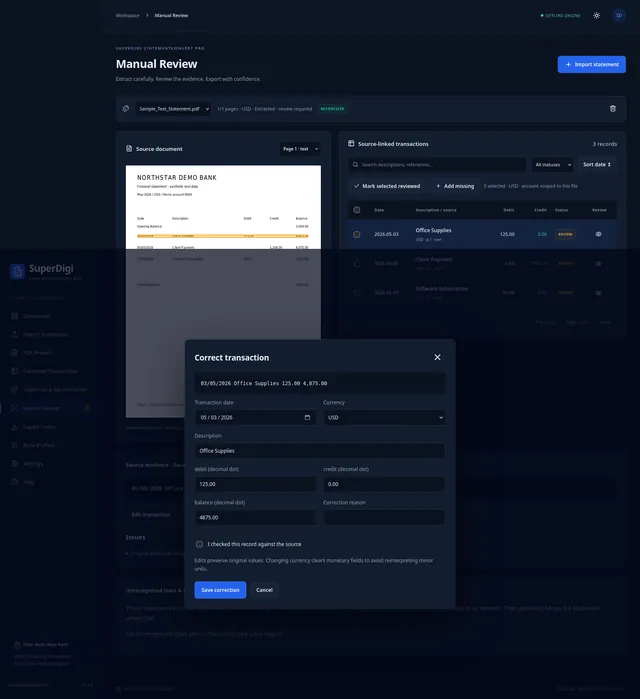
  • Source-linked reviewSee each transaction beside the rendered PDF and highlight the region it came from.
  • Corrections with historyEdit dates, descriptions, and amounts with a reason. Original values are kept, and undo adds a reversing entry.
  • Balance reconciliationCompares printed opening and closing balances, computed totals, and running balances, and shows any difference.
  • Duplicate and unrecognized-row flagsPossible duplicates and rows the app could not interpret are kept for you to inspect, never silently dropped.
  • CSV, Excel (XLSX), and JSON exportChoose CSV columns, order, and delimiter, or download a five-sheet workbook with reconciliation, issues, and source audit.
  • Layout profilesSave, duplicate, import, and export layout profiles for split debit/credit, signed-amount, and dual-date statements.
  • Multiple currencies and date formatsUSD, EUR, GBP, MAD, CAD, AUD, JPY, and KWD with correct decimal precision; one currency per statement.
  • Offline and privateNo account, subscription, bank login, upload endpoint, analytics, or telemetry.

Benefits

  • Spend less time retyping transactions from PDF statements.
  • See exactly where each extracted value came from before you rely on it.
  • Catch balance mismatches, possible duplicates, and unreadable rows early.
  • Prepare clean CSV or Excel files for your bookkeeping workflow.
  • Keep sensitive financial documents on your own computer.

How it works

  1. Import

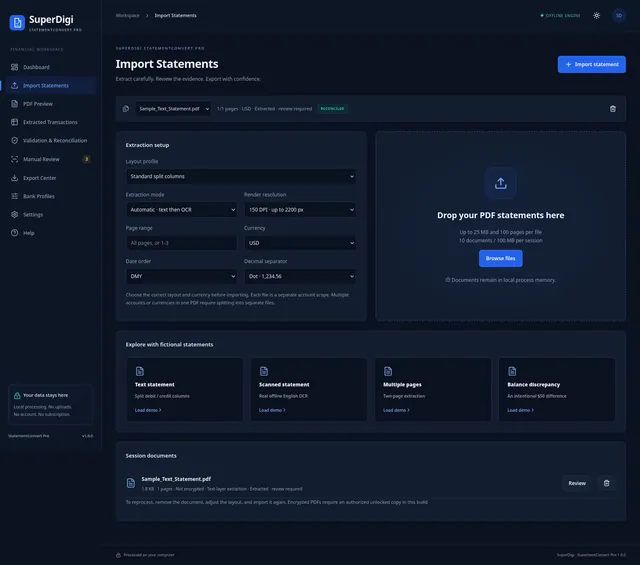
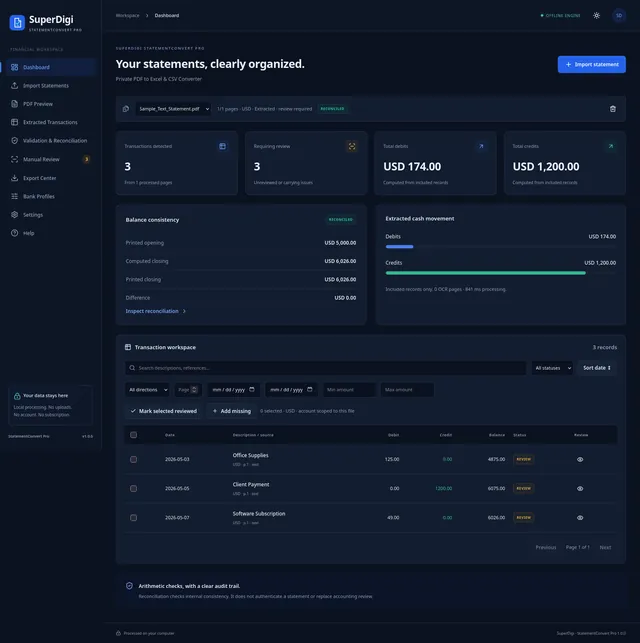
    Start the local launcher, then choose the layout profile, currency, date order, and extraction mode (text, OCR, or automatic). Drop in your PDF, or try a fictional demo statement first.

    StatementConvert Pro dashboard showing a reconciled fictional statement with transaction totals and balance consistency.
  2. Review transactions

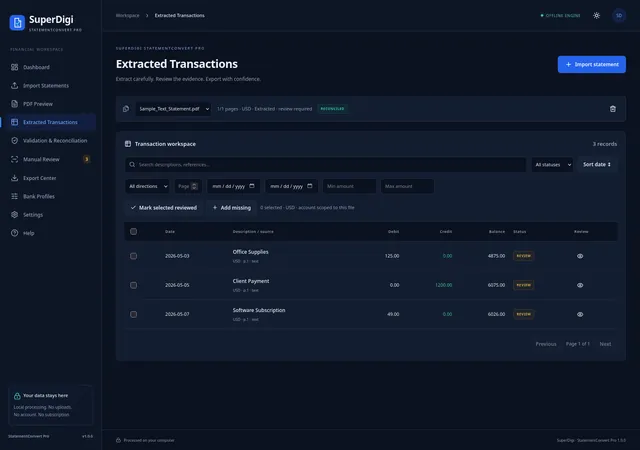
    Browse extracted transactions with filters for direction, dates, amounts, and review status.

    Import Statements screen with layout profile, extraction mode, currency, and date settings beside a PDF drop area.
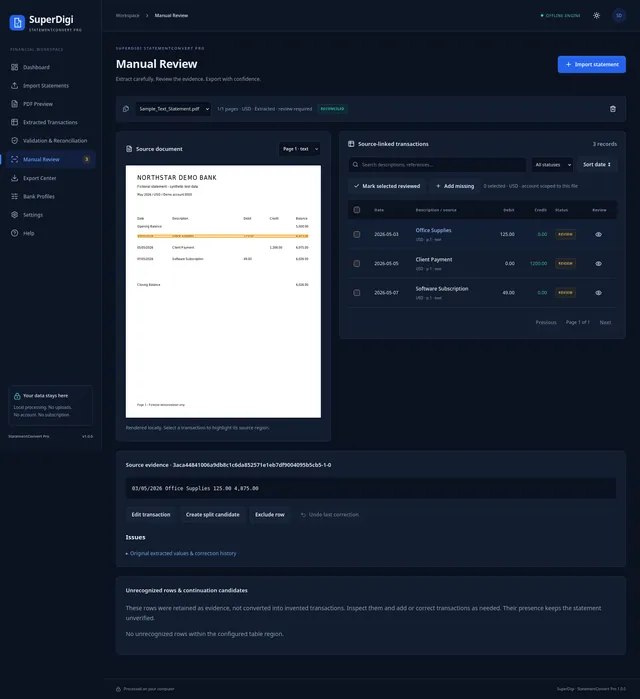
  3. Check the source

    Select a transaction to highlight its original region on the rendered PDF, and inspect unrecognized rows.

    Extracted Transactions table with dates, descriptions, debits, credits, balances, and review status for a fictional statement.
  4. Correct

    Fix a date, description, or amount with a reason and confirm you checked it against the source. The original values stay in the audit trail.

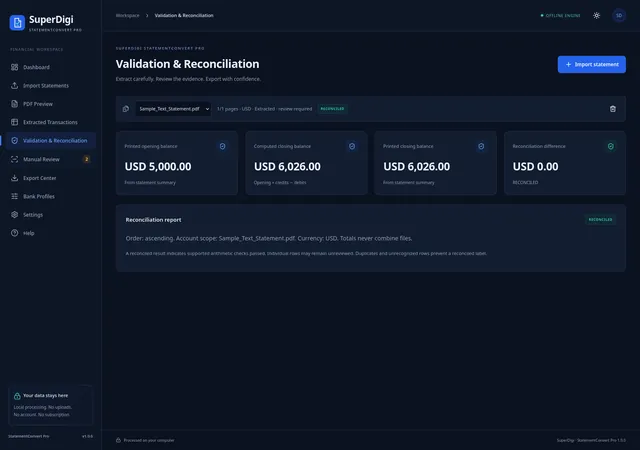
    Validation and Reconciliation screen comparing printed opening and closing balances with the computed closing balance.
  5. Reconcile

    Compare printed and computed balances. Any difference, running-balance error, or possible duplicate is shown before you export.

    Manual Review screen highlighting a transaction on the rendered fictional Northstar Demo Bank PDF next to the extracted records.
  6. Export

    Download CSV with your chosen columns and delimiter, a five-sheet Excel workbook, or audit JSON.

    Correct transaction dialog with the original extracted text, editable fields, a correction reason, and a source-check confirmation.

Who it's for

  • Freelancers organizing their own bank transactions
  • Bookkeepers preparing client statement data
  • Small business owners reconciling accounts
  • Accountants who want a reviewable audit trail
  • Anyone who needs PDF statement transactions in a spreadsheet

What's included

  • SuperDigi StatementConvert Pro v1.0.0 for Linux x86-64 (launcher plus bundled PDF and OCR runtime)
  • Quick Start Guide, Complete User Manual, Privacy and Security Guide, and Reconciliation Explained (PDF and Markdown)
  • Fictional demo statements for testing, including text, scanned, multi-page, and balance-discrepancy examples
  • Example CSV, Excel, audit JSON, and reconciliation report outputs
  • Application license, third-party notices, and license texts
  • A separate corresponding-source download for the bundled open-source components, at no extra charge

Requirements

  • Linux x86-64 only. Tested on Kali Linux with Firefox. Windows, macOS, and ARM are not supported.
  • A modern desktop browser, such as Firefox.
  • Permission to run a downloaded program (you may need to allow execution in the file’s Properties).
  • Local port 39187 available. The app listens only on 127.0.0.1.
  • About 100 MB of free disk space for the extracted application, plus space for your exports.
  • Supported statements: single-account, single-currency PDFs with a matching layout. Up to 25 MB and 100 pages per file.
  • No Python, Node.js, Excel, cloud account, bank login, or internet connection needed for core processing.

Important limitations

  • Linux x86-64 only: Windows, macOS, and ARM computers are not supported.
  • Layout profiles required: Statements must match a configured single-account, single-currency layout. Automatic recognition of every bank is not supported.
  • OCR is English only and works best on upright, readable scans. OCR and extraction accuracy depend on statement quality and format.
  • You must verify results: Reconciliation is an arithmetic check, not statement authentication. Review transactions before any accounting or financial use.
  • Not supported: password-protected PDFs, multiple accounts or currencies in one PDF, dates without a year, and automatic merging of overlapping statements.
  • Session limits: up to 25 MB and 100 pages per PDF, and 10 files or 100 MB per session.
  • Not financial or accounting advice, and not certified for any accounting platform.

Installation & usage

  1. Download and extract the complete application ZIP. Keep the runtime folder next to the launcher.
  2. In 01_Application, run Start-StatementConvert as a program. If nothing happens, allow execution in the file’s Properties or Permissions.
  3. The app opens in your browser. Select Try Demo to process a fictional statement, or open Import Statements.
  4. Choose the layout profile, currency, and date order, then import your PDF.
  5. Review and correct transactions, check Validation & Reconciliation, and export from Export Center.
  6. When you’re done, use Settings → Clear session and close the app. Downloaded exports stay on your computer.

Read 02_Documentation/Quick_Start_Guide.pdf for the full walkthrough.

Delivery

After checkout, Gumroad emails your receipt with a link to your downloads: the application ZIP (about 44 MB) and a separate corresponding-source ZIP for the bundled open-source components (about 850 MB). You only need the application ZIP to use the software.

License

One purchase lets you use version 1.0.0 for personal, professional, and internal business purposes, including your employees and processing statements for your clients. No subscription, account, bank login, or remote activation is required. Future updates and support are not included and may be sold separately. Redistributing, repackaging, reselling, or publicly sharing the proprietary application files is not permitted. Bundled third-party components keep their own licenses (including GPL, LGPL, and MPL), and those rights take precedence; their matching source code is provided at no extra charge. Your documents and exported results remain yours.

Frequently asked questions

Which operating systems are supported?

Linux x86-64 only. It was tested on Kali Linux with Firefox. Windows, macOS, and ARM computers are not supported in this release.

Are my bank statements uploaded anywhere?

No. The app runs a local server on your own computer (127.0.0.1) and opens its interface in your browser. There is no cloud OCR, upload endpoint, analytics, or telemetry. Imported PDFs and transactions are held in memory, and files are saved only when you download an export.

Does it need an internet connection?

Not for core processing. The PDF and OCR engines are bundled, so you can convert statements offline. You need internet only to buy and download the ZIP.

Does it work with every bank?

No. It supports single-account, single-currency statements whose layout matches a profile. You can adjust column positions in Bank Profiles for other layouts, but automatic recognition of every bank is not claimed, and real-bank templates have not been benchmarked.

Can it read scanned PDFs?

Yes, with the bundled English OCR, for upright and readable pages. Poor scans, rotated pages, and unfamiliar layouts may need manual correction. OCR can misread amounts, so review every scanned result.

Does a reconciled balance mean the data is correct?

No. Reconciliation checks that the extracted transactions add up to the statement's balances. It does not authenticate the statement or prove every row is correct. Always verify results against the original before accounting or financial use.

Do I need Excel, Python, or Node.js?

No. The app creates CSV and XLSX files itself and includes everything it needs to run. You only need a modern desktop browser such as Firefox.

Can it open password-protected PDFs?

No. Use an authorized unlocked copy. The app does not bypass or crack passwords.

Can I import into QuickBooks or Xero?

It offers generic signed-amount and debit/credit CSV presets with configurable columns. No QuickBooks, Xero, or other accounting-platform preset is certified or tested, so check the file in your own workflow.

What is the corresponding-source download?

The app bundles open-source PDF, OCR, and runtime components, some under GPL and LGPL licenses. Their matching source code is provided as a separate ZIP in the same Gumroad download, at no extra charge, so you can exercise your rights under those licenses. You don't need it to use the app.

Is this a subscription? Are updates included?

No subscription. It's a one-time purchase of version 1.0.0. Future updates aren't guaranteed and may be sold separately.

What if I need a refund?

Refunds follow the SuperDigi Refund Policy. Please check that your computer and statements fit the requirements and limitations above before buying.

Support

Questions about this product? Email support@superdigi.app

Get SuperDigi StatementConvert Pro

Price: $29.00Buy now
  • main_cover
    Featured

    Software & Micro-SaaS · Software package

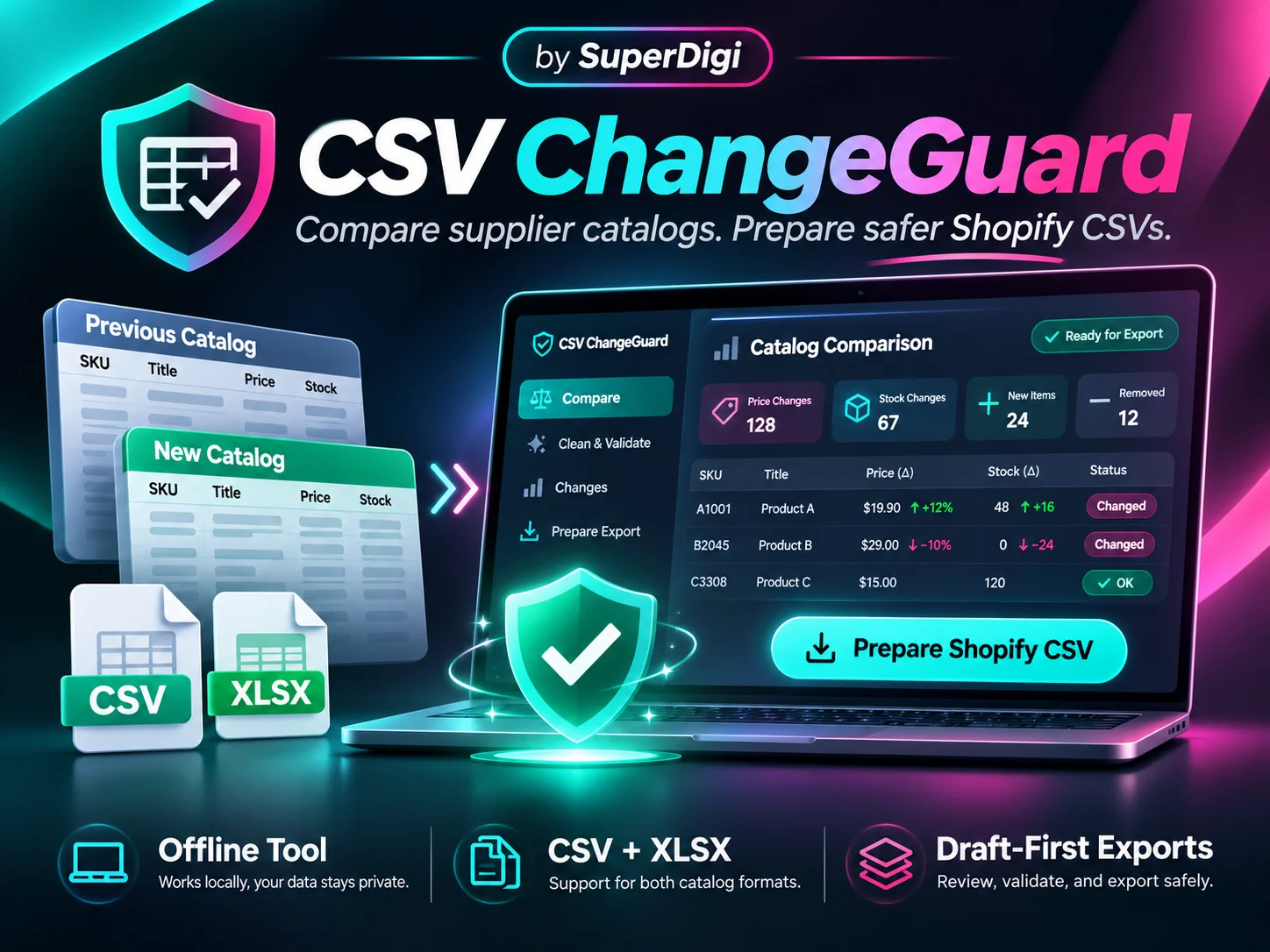
    CSV ChangeGuard

    Compare supplier catalogs, catch price and stock changes, clean CSV/XLSX data, and prepare safer Shopify imports locally. Reuse mappings, review every export, and pay once—without API keys or subscriptions.

    Price: $29.00Original price: $49.99Save 42%
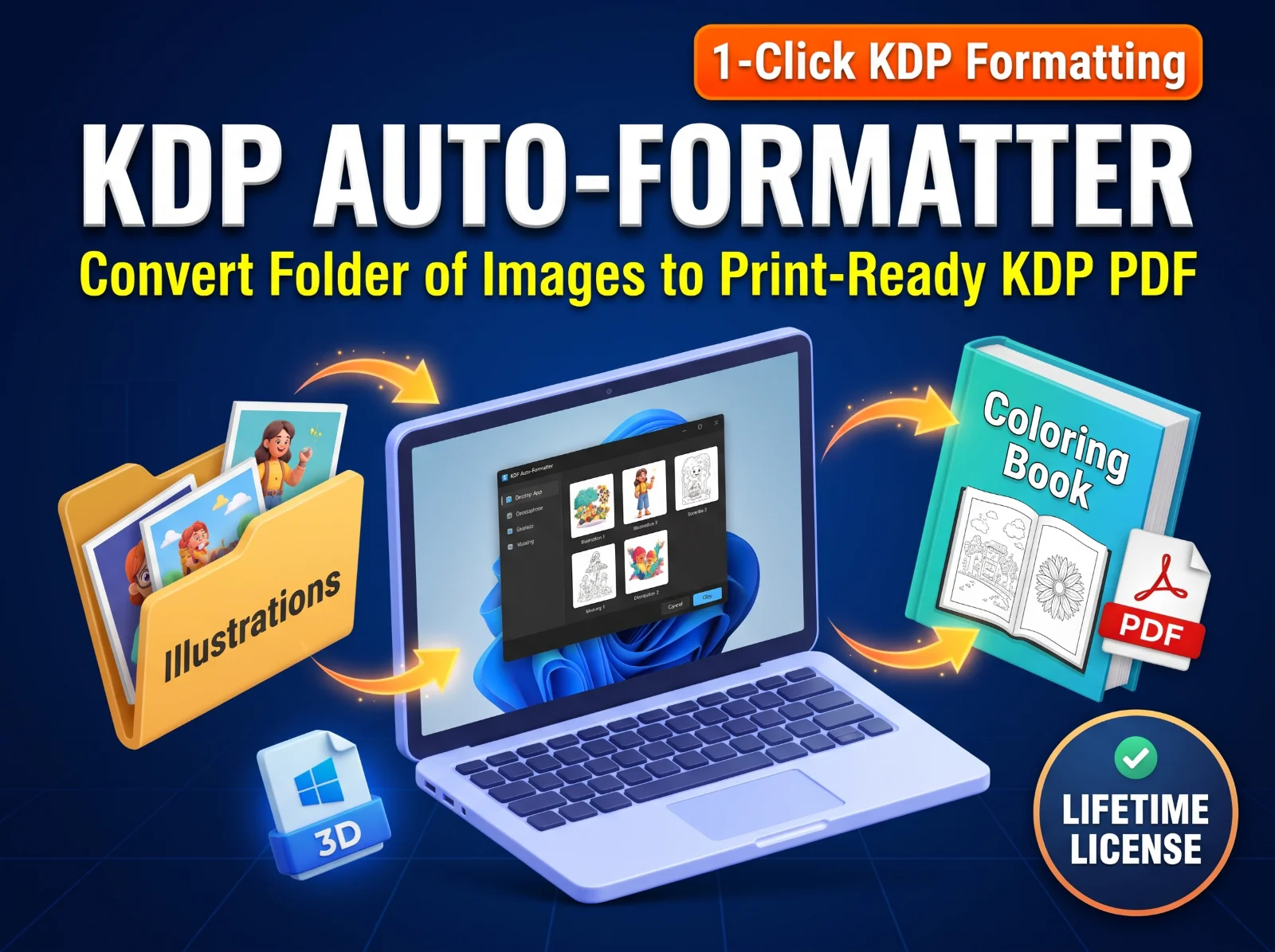
  • KDP Auto-Formatter promo graphic: a folder of illustrations goes through a laptop and comes out as a print-ready coloring book PDF.
    Featured

    Software & Micro-SaaS · Software package

    KDP Auto-Formatter: 1-Click Coloring Book Prep (Lifetime License)

    Stop wasting hours formatting Amazon KDP interiors manually. Turn a folder of raw images into a perfectly sized, print-ready PDF with bleed, correct margins, and blank pages in seconds. 100% offline, no subscriptions.

    Price: $29.00

We use essential cookies to keep you signed in and remember your cart. With your permission we also record anonymous usage (like product views and searches) to improve the store — no advertising. Cloudflare also measures page performance, without cookies. Privacy Policy